
Prerequisites
Before you begin, make sure you have:- Snowflake Account Identifier — found in your Snowflake console under Admin > Accounts.
It typically looks like
VABCDEF-FL12345. - Snowflake Username — you can use an existing user or create a dedicated service user (see below).
Optional: Create a dedicated service user
If you’d like a dedicated service user for Modus, run the following SQL in your Snowflake worksheet:Setup
1
Set up role and permissions
Create a role and grant the minimum permissions Modus needs to read your data.
Run the following SQL in your Snowflake worksheet:Replace the placeholders with your actual values:
2
Generate authentication keys
Modus supports two authentication methods for Snowflake:
Key Pair Authentication (recommended) and Username/Password.
This step covers the Key Pair method, which follows Snowflake’s recommended
security practices — no passwords are stored, only cryptographic keys.Open your terminal and run:This generates two files:
private_key.pem— Keep this secure. You will upload it to Modus.public_key.pem— Copy the full output; you’ll attach it to your Snowflake user in the next step.
3
Attach the public key to the Snowflake user
Register the public key with your Snowflake user by running:Replace
<your-public-key> with the contents of public_key.pem
(without the BEGIN/END header lines).4
Connect in Modus
- Log into Modus.
- Navigate to the connections page and click New Connection.
- Fill in the connection form (see the field reference below).
- Click Test Connection to verify the connection works.
- Click Save Connection.
Connection form field reference
Basic information
Connection details
Authentication
Select your preferred Authentication Method from the dropdown.- Key Pair (recommended)
- Username / Password
Database configuration
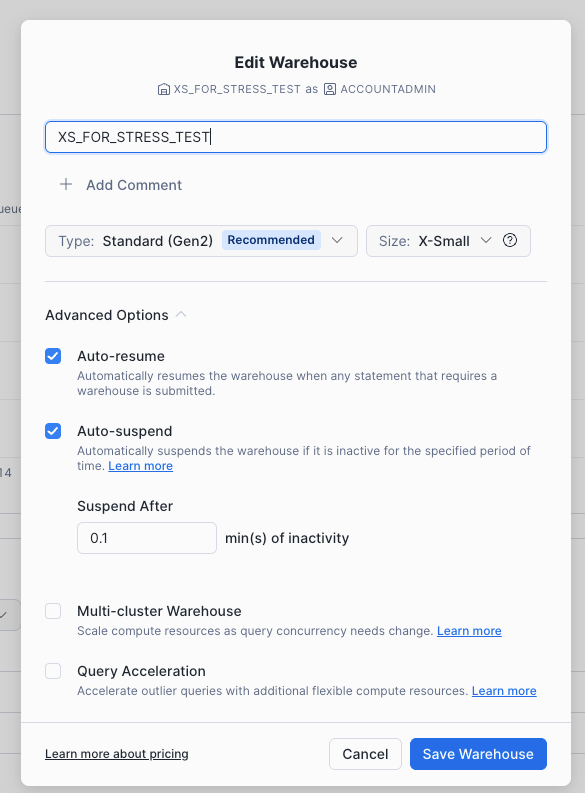
Recommended warehouse settings
Modus runs lightweight, read-only queries against your data. To keep costs low, we recommend creating a dedicated warehouse with the following settings:
You can configure these in the Snowflake console under Admin > Warehouses. Select
your warehouse (or create a new one) and click Edit to apply the settings above.
Verification
Your Snowflake account is now connected to Modus. The platform will begin profiling your schemas, tables, and columns so that Modus can provide context-aware answers about your data. Need help? Contact us at support@getmodus.com.Modus supports Key Pair Authentication using JWT with RSA key pairs, following Snowflake’s
recommended security practices for third-party integrations. This method stores no passwords
and provides strong cryptographic security. Username/Password authentication is also available,
but Key Pair is the recommended approach. All credentials are stored securely and encrypted at rest.