
Connect a single scope (recommended)
The most focused way to use Modus in a tool is to connect one published scope — your revenue analyst, your support expert. The host gets exactly that scope’schat, its curated context, and any integration tools
you’ve published on it, and nothing else. It’s the cleanest mental model: one
tool, one expert.
Open the scope, go to its MCP tab, and copy the snippet (or one-click
install) for your host:
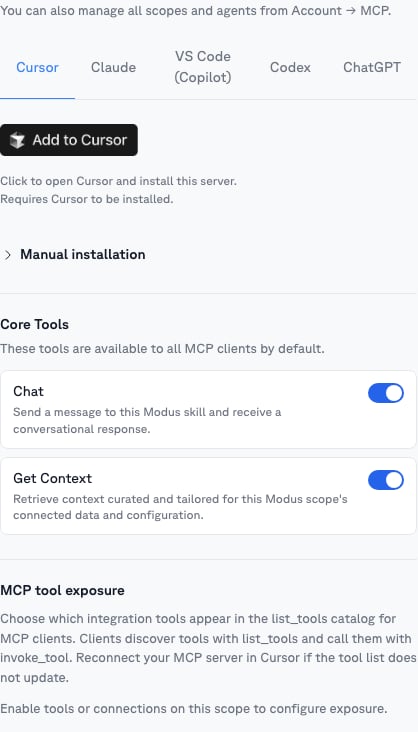
- Core Tools — toggle
chatandget_contexton or off for MCP clients. - MCP tool exposure — choose which of the scope’s integration tools (for
example
jira_create_issue) appear in the host’s tool list.
A scope’s MCP endpoint only goes live once the scope is published. If the
MCP tab shows a Deploy scope prompt, publish the scope first.
Connect all of Modus
Prefer one connection that reaches every scope and workflow you can access? Connect the org-level endpoint instead — the host discovers and chats with any published scope, or runs any workflow, and Modus routes each question to the right one. Open it from your avatar → Manage account → MCP: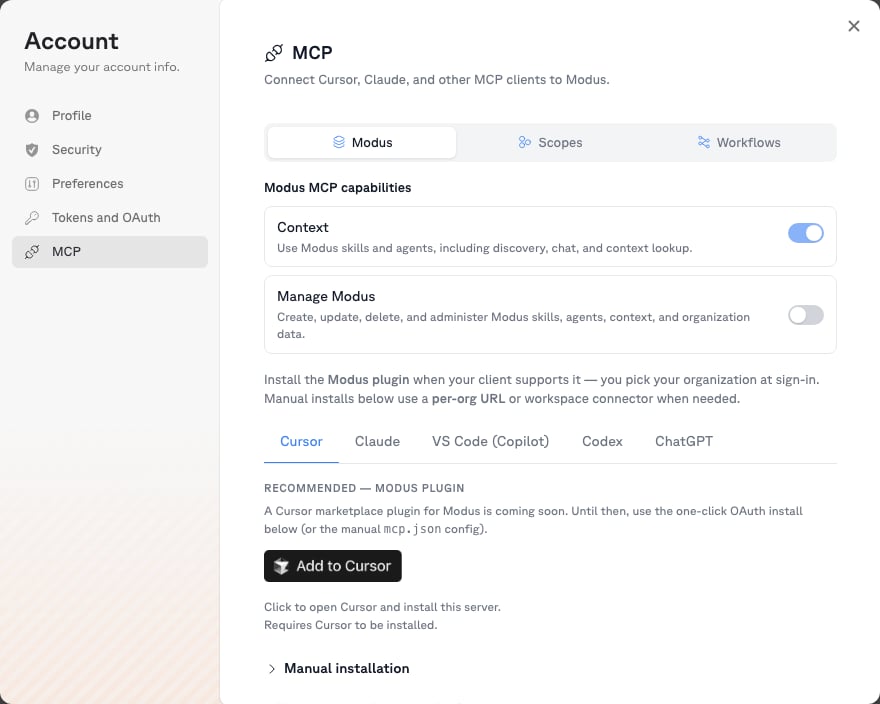
Choose your endpoint
You never construct these URLs by hand — Modus generates them with ready-to-paste
install snippets: a scope’s MCP tab (or a workflow’s MCP tab) for that one
resource, and Account → MCP for the org-level endpoints.
Set up your host
Each host has a short guide with exact steps and config:Claude (Desktop & Code)
Install the Modus plugins — the fastest path.
Cursor
One-click install link or a small mcp.json entry.
VS Code (Copilot)
Agent mode with a .vscode/mcp.json entry.
ChatGPT
Add Modus as a custom connector in developer mode.
Codex
One CLI command, or a TOML entry for the desktop app.
Authentication
OAuth is the default. When a host first connects, your browser opens a Modus sign-in and consent screen showing exactly what the host will be able to do (read and invoke your scopes and workflows, read org context). If you belong to several organizations you pick one at consent. Tokens are short-lived and refresh automatically. Personal Access Tokens work as an alternative for CLI and headless environments — create one under Settings → API Tokens and send it as aBearer token. See Authentication.
To see or revoke what you’ve connected, go to
Settings → Connected apps
and click Revoke next to a host. Org admins can also disable an OAuth client
for the whole organization.
What the tools do
A per-scope endpoint exposeschat, get_context, and get_context_item
for that scope, plus any integration tools published on it (for example
jira_create_issue). If a scope publishes more than 10 tools, they’re served
through list_tools / invoke_tool to keep the tool list small. You control all
of this from the scope’s MCP tab — including turning core tools off entirely.
The org-level Modus (Chat) endpoint instead exposes a small, fixed toolset
for discovering and routing across everything you can access:
Modus (Manage) exposes the management API as tools (
scopes_create,
workflows_deploy, context_items_update, …). Destructive operations require
explicit confirmation, and some operations are deliberately unavailable over
MCP — context can’t be bulk-mutated, tokens can’t be minted, and organizations
can’t be deleted.
Scope slash commands
On hosts that support MCP prompts (Claude Code and Cursor), every published scope also appears as a slash command — for example/scope-revenue-analytics. Selecting it points the conversation at that scope.
On Claude Desktop use the + attachment menu; on ChatGPT and Codex just ask
in natural language.