
Custom connectors require ChatGPT’s developer mode, available on plans
that support it. Connectors use OAuth — Personal Access Tokens aren’t
supported here.
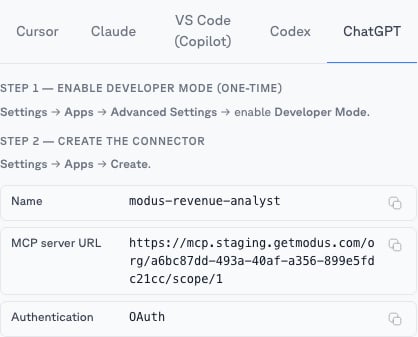
Add the connector
1
Enable developer mode
In ChatGPT, go to Settings → Apps → Advanced settings and enable
Developer mode.
2
Create the connector
Go to Settings → Apps → Create and fill in the values from a
scope’s MCP tab → ChatGPT (recommended — one
connector, one expert):
- Name: e.g.
Modus – Revenue Analyst - MCP server URL: the scope’s URL, e.g.
https://mcp.getmodus.com/org/<org>/scope/<scopeId>— or, to connect all of Modus,https://mcp.getmodus.com/modus?toolsets=contextfrom Account → MCP - Authentication: OAuth
3
Sign in
Acknowledge ChatGPT’s connector notice and create it. Your browser opens the
Modus sign-in — approve access and choose your organization.