> ## Documentation Index
> Fetch the complete documentation index at: https://docs.getmodus.com/llms.txt
> Use this file to discover all available pages before exploring further.
# Snowflake
> Connect your Snowflake account to Modus so you can query and analyze your data with scopes.
Connect your Snowflake account to Modus so you can query and
analyze your data with scopes. This guide takes about five minutes.
## Prerequisites
Before you begin, make sure you have:
* **Snowflake Account Identifier** — found in your Snowflake console under **Admin > Accounts**.
It typically looks like `VABCDEF-FL12345`.
* **Snowflake Username** — you can use an existing user or create a dedicated service user (see below).
### Optional: Create a dedicated service user
If you'd like a dedicated service user for Modus, run the following SQL in your Snowflake worksheet:
```sql theme={null}
CREATE USER modus_service_user
DEFAULT_ROLE = MODUS_ANALYST
DEFAULT_WAREHOUSE = COMPUTE_WH
TYPE = SERVICE;
```
## Setup
Create a role and grant the minimum permissions Modus needs to read your data.
Run the following SQL in your Snowflake worksheet:
```sql theme={null}
CREATE ROLE IF NOT EXISTS MODUS_ANALYST;
GRANT SELECT ON ALL TABLES IN SCHEMA . TO ROLE MODUS_ANALYST;
GRANT USAGE ON DATABASE TO ROLE MODUS_ANALYST;
GRANT USAGE ON SCHEMA . TO ROLE MODUS_ANALYST;
GRANT USAGE ON WAREHOUSE TO ROLE MODUS_ANALYST;
GRANT ROLE MODUS_ANALYST TO USER ;
```
Replace the placeholders with your actual values:
| Placeholder | Description |
| --------------------------------- | --------------------------------------- |
| `` | Your Snowflake database name |
| `` | Your Snowflake schema name |
| `` | Your Snowflake warehouse name |
| `` | Your username or the service user above |
Modus supports two authentication methods for Snowflake:
**Key Pair Authentication** (recommended) and **Username/Password**.
This step covers the Key Pair method, which follows Snowflake's recommended
security practices — no passwords are stored, only cryptographic keys.
If you prefer Username/Password authentication, skip Steps 2 and 3 and go
directly to [Step 4: Connect in Modus](#connect-in-modus).
Open your terminal and run:
```bash theme={null}
openssl genrsa 2048 | openssl pkcs8 -topk8 -inform PEM -out private_key.pem -nocrypt
openssl rsa -in private_key.pem -pubout -out public_key.pem
cat public_key.pem
```
This generates two files:
* `private_key.pem` — Keep this secure. You will upload it to Modus.
* `public_key.pem` — Copy the full output; you'll attach it to your Snowflake user in the next step.
Register the public key with your Snowflake user by running:
```sql theme={null}
ALTER USER
SET RSA_PUBLIC_KEY='';
```
Replace `` with the contents of `public_key.pem`
(without the `BEGIN`/`END` header lines).
1. Log into [Modus](https://app.getmodus.com).
2. Navigate to the connections page and click **New Connection**.
3. Fill in the connection form (see the field reference below).
4. Click **Test Connection** to verify the connection works.
5. Click **Save Connection**.
## Connection form field reference
### Basic information
| Field | Description | Example |
| ------------------- | ----------------------------------- | ---------------------- |
| **Connection Name** | A friendly name for this connection | `Production Snowflake` |
### Connection details
| Field | Description | Example |
| ---------------------- | --------------------------------- | ----------------- |
| **Account Identifier** | Your Snowflake account identifier | `VABCDEF-FL12345` |
### Authentication
Select your preferred **Authentication Method** from the dropdown.
| Field | Description | Example |
| ---------------------------- | --------------------------------------- | ----------------- |
| **Username** | Snowflake username or service user | `MODUS_ANALYST` |
| **Private Key (PEM format)** | Contents of your `private_key.pem` file | *(full PEM file)* |
| Field | Description | Example |
| ------------ | ------------------ | ----------------- |
| **Username** | Snowflake username | `MODUS_ANALYST` |
| **Password** | Snowflake password | *(your password)* |
### Database configuration
| Field | Description | Example |
| --------------------- | -------------------------------- | -------------- |
| **Warehouse Name** | The warehouse to use for queries | `ANALYTICS_WH` |
| **Role** *(optional)* | The Snowflake role to assume | `ANALYST_ROLE` |
## Recommended warehouse settings
Modus runs lightweight, read-only queries against your data. To keep costs low, we
recommend creating a dedicated warehouse with the following settings:
| Setting | Recommended value | Why |
| --------------------------- | ------------------- | -------------------------------------------------------------------------------------------------------- |
| **Size** | X-Small | Sufficient for Modus's catalog and profiling queries |
| **Type** | Standard (Gen2) | Improved performance and efficiency over Gen1 |
| **Auto-suspend** | 0.1 min (6 seconds) | Suspends the warehouse almost immediately after each query completes, so you only pay for active compute |
| **Auto-resume** | Enabled | Automatically spins the warehouse back up when Modus runs a query |
| **Multi-cluster Warehouse** | Disabled | Not needed — Modus queries are sequential and low-concurrency |
| **Query Acceleration** | Disabled | Not needed — Modus queries are small and fast |
You can configure these in the Snowflake console under **Admin > Warehouses**. Select
your warehouse (or create a new one) and click **Edit** to apply the settings above.
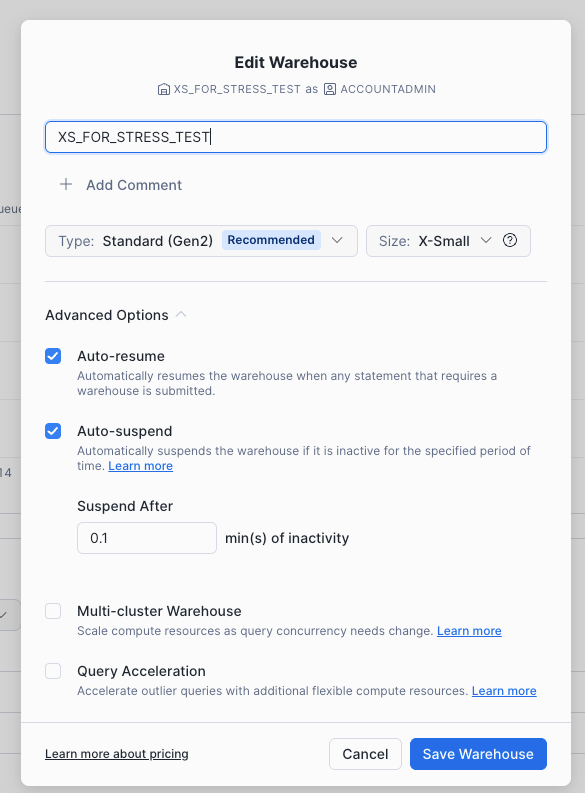 With auto-suspend set to the minimum (0.1 min) and an X-Small warehouse at 1 credit/hour,
you'll only consume credits during the brief moments Modus is actively querying — typically
just seconds at a time.
## Verification
Your Snowflake account is now connected to Modus. The platform will begin profiling your
schemas, tables, and columns so that Modus can provide context-aware answers about your data.
Need help? Contact us at [support@getmodus.com](mailto:support@getmodus.com).
Modus supports **Key Pair Authentication** using JWT with RSA key pairs, following Snowflake's
recommended security practices for third-party integrations. This method stores no passwords
and provides strong cryptographic security. Username/Password authentication is also available,
but Key Pair is the recommended approach. All credentials are stored securely and encrypted at rest.
With auto-suspend set to the minimum (0.1 min) and an X-Small warehouse at 1 credit/hour,
you'll only consume credits during the brief moments Modus is actively querying — typically
just seconds at a time.
## Verification
Your Snowflake account is now connected to Modus. The platform will begin profiling your
schemas, tables, and columns so that Modus can provide context-aware answers about your data.
Need help? Contact us at [support@getmodus.com](mailto:support@getmodus.com).
Modus supports **Key Pair Authentication** using JWT with RSA key pairs, following Snowflake's
recommended security practices for third-party integrations. This method stores no passwords
and provides strong cryptographic security. Username/Password authentication is also available,
but Key Pair is the recommended approach. All credentials are stored securely and encrypted at rest.