> ## Documentation Index
> Fetch the complete documentation index at: https://docs.getmodus.com/llms.txt
> Use this file to discover all available pages before exploring further.
# Cursor
> Connect Cursor to Modus over MCP with a one-click install link or a small mcp.json entry.
Connect Cursor to Modus and it can answer data questions, use your published
scopes, and run workflows while you code — grounded in your organization's
context.
 ## One-click install (recommended)
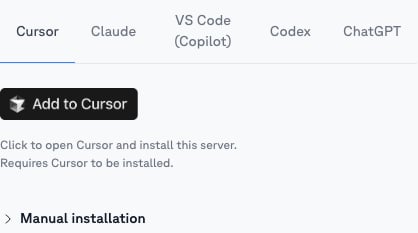
Open the [scope](/guides/scopes) you want in Cursor, go to its **MCP** tab,
and click the **Cursor** tab, then the **Add to Cursor** button — it opens
Cursor and pre-fills that scope's server. (To connect *all* of Modus instead,
use **Account → MCP**.)
Confirm the new MCP server in Cursor. Your browser opens the Modus sign-in —
approve access and choose your organization.
## Manual configuration
Prefer to paste it yourself? Copy the scope's URL from its **MCP** tab and add it
to `~/.cursor/mcp.json` (all projects) or `.cursor/mcp.json` (one project):
```json theme={null}
{
"mcpServers": {
"modus-revenue-analyst": {
"url": "https://mcp.getmodus.com/org//scope/"
}
}
}
```
To connect all of Modus instead, use the org-level URL
(`https://mcp.getmodus.com/modus?toolsets=context`) from **Account → MCP**.
Cursor handles the OAuth sign-in automatically; a Personal Access Token also
works — see [Authentication](/authentication).
## Using it
Ask org questions in the chat panel — Cursor calls Modus when your question
needs organizational knowledge. Published scopes also appear as slash commands
(for example `/scope-revenue-analytics`) to point the conversation at one
expert.
Need help? Contact us at [support@getmodus.com](mailto:support@getmodus.com).
## One-click install (recommended)
Open the [scope](/guides/scopes) you want in Cursor, go to its **MCP** tab,
and click the **Cursor** tab, then the **Add to Cursor** button — it opens
Cursor and pre-fills that scope's server. (To connect *all* of Modus instead,
use **Account → MCP**.)
Confirm the new MCP server in Cursor. Your browser opens the Modus sign-in —
approve access and choose your organization.
## Manual configuration
Prefer to paste it yourself? Copy the scope's URL from its **MCP** tab and add it
to `~/.cursor/mcp.json` (all projects) or `.cursor/mcp.json` (one project):
```json theme={null}
{
"mcpServers": {
"modus-revenue-analyst": {
"url": "https://mcp.getmodus.com/org//scope/"
}
}
}
```
To connect all of Modus instead, use the org-level URL
(`https://mcp.getmodus.com/modus?toolsets=context`) from **Account → MCP**.
Cursor handles the OAuth sign-in automatically; a Personal Access Token also
works — see [Authentication](/authentication).
## Using it
Ask org questions in the chat panel — Cursor calls Modus when your question
needs organizational knowledge. Published scopes also appear as slash commands
(for example `/scope-revenue-analytics`) to point the conversation at one
expert.
Need help? Contact us at [support@getmodus.com](mailto:support@getmodus.com).