> ## Documentation Index
> Fetch the complete documentation index at: https://docs.getmodus.com/llms.txt
> Use this file to discover all available pages before exploring further.
# Codex
> Connect Codex (CLI or desktop app) to Modus over MCP.
Codex can use Modus as an MCP server from both the CLI and the desktop app.
 ## Codex CLI
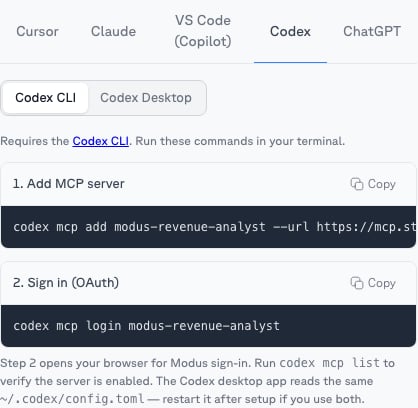
The most focused setup is a single [scope](/guides/scopes). Open the scope's
**MCP** tab → **Codex** and copy its ready-made commands:
```bash theme={null}
codex mcp add modus-revenue-analyst --url https://mcp.getmodus.com/org//scope/
codex mcp login modus-revenue-analyst
```
`codex mcp login` opens the Modus sign-in in your browser — approve access and
choose your organization. To connect **all** of Modus instead, use the org-level
URL from **Account → MCP**:
```bash theme={null}
codex mcp add modus --url https://mcp.getmodus.com/modus?toolsets=context
codex mcp login modus
```
## Codex desktop app
Add Modus in the app's MCP settings, or directly in `~/.codex/config.toml` — use
a scope's URL (from its **MCP** tab) or the org-level URL:
```toml theme={null}
[mcp_servers.modus-revenue-analyst]
url = "https://mcp.getmodus.com/org//scope/"
```
Restart Codex; the first request triggers the OAuth sign-in.
## Using it
Ask org questions in natural language — Codex discovers your published scopes
and workflows through Modus's tools. Codex doesn't support MCP slash commands,
so name the scope you want in your question when it matters.
Need help? Contact us at [support@getmodus.com](mailto:support@getmodus.com).
## Codex CLI
The most focused setup is a single [scope](/guides/scopes). Open the scope's
**MCP** tab → **Codex** and copy its ready-made commands:
```bash theme={null}
codex mcp add modus-revenue-analyst --url https://mcp.getmodus.com/org//scope/
codex mcp login modus-revenue-analyst
```
`codex mcp login` opens the Modus sign-in in your browser — approve access and
choose your organization. To connect **all** of Modus instead, use the org-level
URL from **Account → MCP**:
```bash theme={null}
codex mcp add modus --url https://mcp.getmodus.com/modus?toolsets=context
codex mcp login modus
```
## Codex desktop app
Add Modus in the app's MCP settings, or directly in `~/.codex/config.toml` — use
a scope's URL (from its **MCP** tab) or the org-level URL:
```toml theme={null}
[mcp_servers.modus-revenue-analyst]
url = "https://mcp.getmodus.com/org//scope/"
```
Restart Codex; the first request triggers the OAuth sign-in.
## Using it
Ask org questions in natural language — Codex discovers your published scopes
and workflows through Modus's tools. Codex doesn't support MCP slash commands,
so name the scope you want in your question when it matters.
Need help? Contact us at [support@getmodus.com](mailto:support@getmodus.com).