> ## Documentation Index
> Fetch the complete documentation index at: https://docs.getmodus.com/llms.txt
> Use this file to discover all available pages before exploring further.
# ChatGPT
> Connect ChatGPT to Modus by adding it as a custom connector in developer mode.
ChatGPT can use Modus as a **custom connector**, so conversations can pull in
your organization's scopes, workflows, and context.
Custom connectors require ChatGPT's **developer mode**, available on plans
that support it. Connectors use OAuth — Personal Access Tokens aren't
supported here.
 ## Add the connector
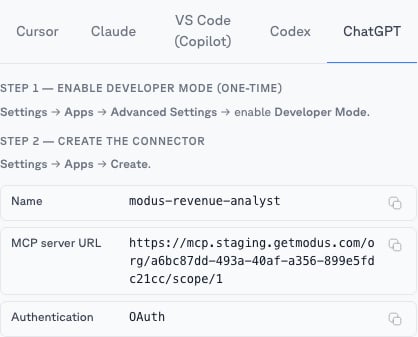
In ChatGPT, go to **Settings → Apps → Advanced settings** and enable
**Developer mode**.
Go to **Settings → Apps → Create** and fill in the values from a
[scope](/guides/scopes)'s **MCP** tab → **ChatGPT** (recommended — one
connector, one expert):
* **Name:** e.g. `Modus – Revenue Analyst`
* **MCP server URL:** the scope's URL, e.g.
`https://mcp.getmodus.com/org//scope/` — or, to connect all
of Modus, `https://mcp.getmodus.com/modus?toolsets=context` from
**Account → MCP**
* **Authentication:** OAuth
Acknowledge ChatGPT's connector notice and create it. Your browser opens the
Modus sign-in — approve access and choose your organization.
## Using it
Enable the Modus connector in a conversation and ask in natural language —
*"Using Modus, summarize how we calculate monthly recurring revenue."* ChatGPT
doesn't support MCP slash commands, so name the scope you want in your question
when it matters.
Need help? Contact us at [support@getmodus.com](mailto:support@getmodus.com).
## Add the connector
In ChatGPT, go to **Settings → Apps → Advanced settings** and enable
**Developer mode**.
Go to **Settings → Apps → Create** and fill in the values from a
[scope](/guides/scopes)'s **MCP** tab → **ChatGPT** (recommended — one
connector, one expert):
* **Name:** e.g. `Modus – Revenue Analyst`
* **MCP server URL:** the scope's URL, e.g.
`https://mcp.getmodus.com/org//scope/` — or, to connect all
of Modus, `https://mcp.getmodus.com/modus?toolsets=context` from
**Account → MCP**
* **Authentication:** OAuth
Acknowledge ChatGPT's connector notice and create it. Your browser opens the
Modus sign-in — approve access and choose your organization.
## Using it
Enable the Modus connector in a conversation and ask in natural language —
*"Using Modus, summarize how we calculate monthly recurring revenue."* ChatGPT
doesn't support MCP slash commands, so name the scope you want in your question
when it matters.
Need help? Contact us at [support@getmodus.com](mailto:support@getmodus.com).