> ## Documentation Index
> Fetch the complete documentation index at: https://docs.getmodus.com/llms.txt
> Use this file to discover all available pages before exploring further.
# LookML
> Connect your LookML models to Modus so your scopes have rich context about your semantic layer.
Connect your LookML models to Modus so its explores, views, and fields become
context that Modus can reason over. Modus reads your LookML **read-only** from
one of two sources — a **Git repository** or a **Looker instance** — and stores
any credentials encrypted in AWS Secrets Manager.
## Choose a source
On the connection form, choose a **Connection Source**:
* **Git Repo** — read LookML files directly from a Git repository (GitHub today; GitLab and Bitbucket are coming soon).
* **Looker Instance** — read models directly from Looker via its API.
## Set up access
Modus reads your LookML files from GitHub via a GitHub App connection.
1. In the form, keep **Git Repo** selected and **GitHub** as the provider.
2. Click **Connect GitHub Account** and authorize the Modus GitHub App with
**read access** to the repository that holds your LookML.
3. Select the **repository** and **branch** (defaults to `main`).
Modus reads models through the Looker API. Create an **API3 key** (Client ID
* Client Secret) for a user whose role grants these permissions:
- `access_data`
- `see_lookml`
- `see_lookml_dashboards`
- `see_sql`
- `explore`
Make sure the role's **model set** covers the LookML models you want Modus to
use. You'll also need the **Looker instance URL**.
## Network access
If you use the **Looker Instance** source and your Looker is behind a firewall,
allow Modus's egress IP addresses so it can reach it. See
[IP Allowlisting](/guides/ip-allowlist).
## Connect in Modus
1. Log into [Modus](https://app.getmodus.com).
2. Click **Integrations** in the left sidebar.
3. Find the **LookML** card under **Semantic Layers** and click **Connect**.
Select **Git Repo** or **Looker Instance** and complete the fields for that
source (see [Set up access](#set-up-access) above).
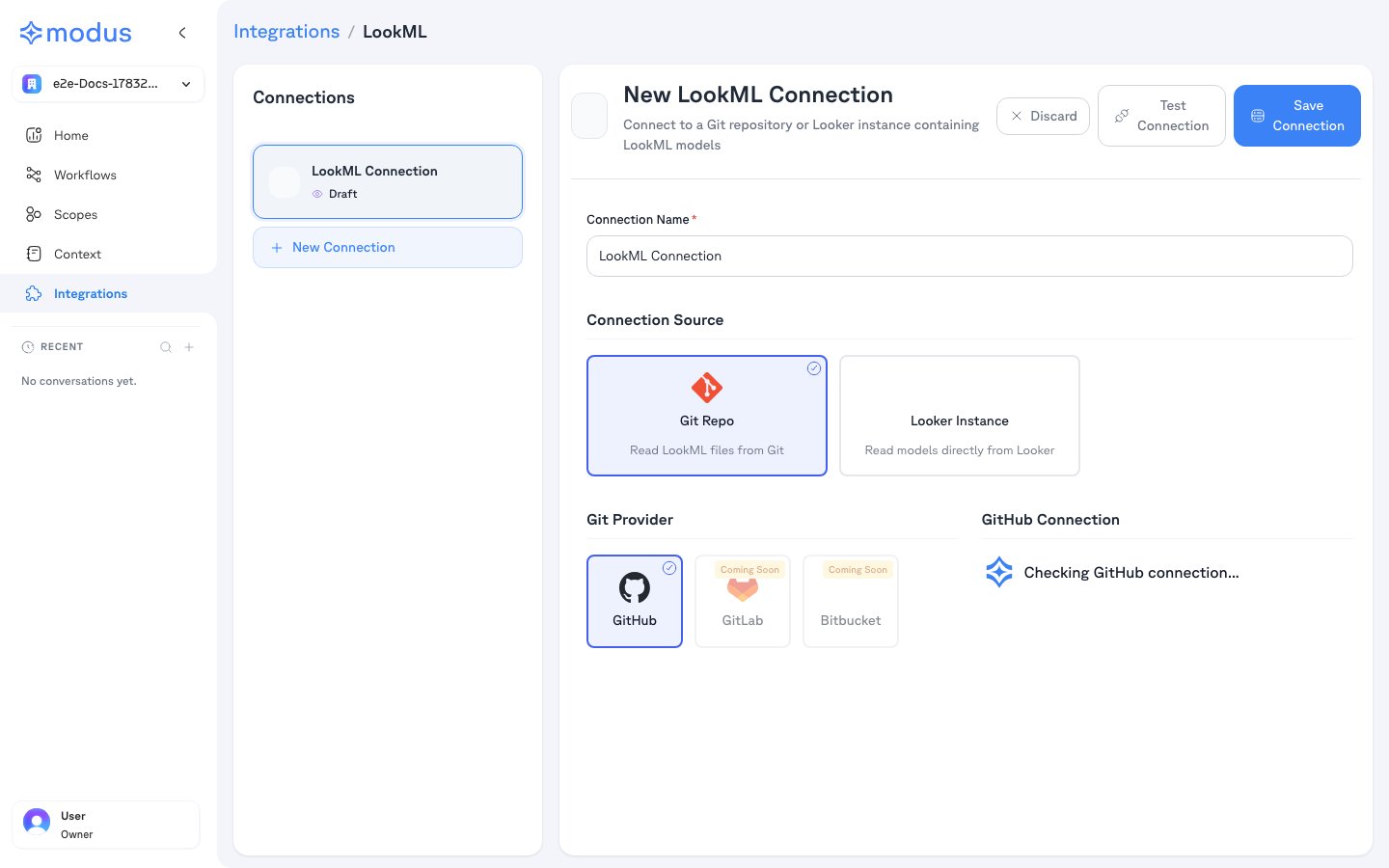 1. Click **Test Connection** to verify Modus can read your LookML.
2. Click **Save Connection**.
## Connection form field reference
**Git Repo source**
| Field | Description |
| --------------------- | ------------------------------------------ |
| **Connection Name** | A friendly name for this connection |
| **GitHub Connection** | The authorized Modus GitHub App connection |
| **Repository** | The repo containing your LookML |
| **Branch** | The branch to read (defaults to `main`) |
**Looker Instance source**
| Field | Description | Example |
| ----------------------- | ----------------------------------- | ---------------------------------- |
| **Connection Name** | A friendly name for this connection | `My LookML Project` |
| **Looker Instance URL** | Your Looker base URL | `https://your-instance.looker.com` |
| **Client ID** | Looker API client ID | *(from Looker)* |
| **Client Secret** | Looker API client secret | *(your secret)* |
## Troubleshooting
| Symptom | Likely cause |
| ---------------------------------- | ------------------------------------------------------------------------------------------------------------- |
| **GitHub connection fails** | The GitHub App wasn't authorized, or lacks read access to the repo. |
| **Repository or branch not found** | The connection can't see the repo, or the branch name is wrong. |
| **Looker authentication failed** | Wrong instance URL or API3 client ID/secret. |
| **Missing permissions (Looker)** | The role lacks `access_data`, `see_lookml`, `see_sql`, `explore`, or the model set doesn't cover your models. |
## Verification
Your LookML is now connected. Modus turns your explores, views, and fields into
context so Modus can give accurate, semantic-layer-aware answers.
Need help? Contact us at [support@getmodus.com](mailto:support@getmodus.com).
Modus connects read-only and requests only the minimum access needed to
understand your models. Any credentials are encrypted and stored in AWS Secrets
Manager — never in plaintext.
1. Click **Test Connection** to verify Modus can read your LookML.
2. Click **Save Connection**.
## Connection form field reference
**Git Repo source**
| Field | Description |
| --------------------- | ------------------------------------------ |
| **Connection Name** | A friendly name for this connection |
| **GitHub Connection** | The authorized Modus GitHub App connection |
| **Repository** | The repo containing your LookML |
| **Branch** | The branch to read (defaults to `main`) |
**Looker Instance source**
| Field | Description | Example |
| ----------------------- | ----------------------------------- | ---------------------------------- |
| **Connection Name** | A friendly name for this connection | `My LookML Project` |
| **Looker Instance URL** | Your Looker base URL | `https://your-instance.looker.com` |
| **Client ID** | Looker API client ID | *(from Looker)* |
| **Client Secret** | Looker API client secret | *(your secret)* |
## Troubleshooting
| Symptom | Likely cause |
| ---------------------------------- | ------------------------------------------------------------------------------------------------------------- |
| **GitHub connection fails** | The GitHub App wasn't authorized, or lacks read access to the repo. |
| **Repository or branch not found** | The connection can't see the repo, or the branch name is wrong. |
| **Looker authentication failed** | Wrong instance URL or API3 client ID/secret. |
| **Missing permissions (Looker)** | The role lacks `access_data`, `see_lookml`, `see_sql`, `explore`, or the model set doesn't cover your models. |
## Verification
Your LookML is now connected. Modus turns your explores, views, and fields into
context so Modus can give accurate, semantic-layer-aware answers.
Need help? Contact us at [support@getmodus.com](mailto:support@getmodus.com).
Modus connects read-only and requests only the minimum access needed to
understand your models. Any credentials are encrypted and stored in AWS Secrets
Manager — never in plaintext.