> ## Documentation Index
> Fetch the complete documentation index at: https://docs.getmodus.com/llms.txt
> Use this file to discover all available pages before exploring further.
# dbt Cloud
> Connect your dbt Cloud Semantic Layer to Modus so your scopes have rich context about your metrics.
Connect your dbt Cloud **Semantic Layer** to Modus so its semantic models,
metrics, and saved queries become context that Modus can reason over. Modus
connects **read-only** through the dbt Cloud APIs and stores your service token
encrypted in AWS Secrets Manager.
## Prerequisites
Before you begin, make sure you have:
* A **dbt Cloud** account with the **Semantic Layer** enabled and a built semantic manifest.
* Your **Account URL** and **Account ID**.
* A **service token** with read access to the Discovery (Metadata) API (see below).
## Set up a service token
Both appear in your dbt Cloud URL. The **Account URL** is your access URL
(e.g. `https://cloud.getdbt.com` or a region host like
`https://bj284.us1.dbt.com`); the **Account ID** is the number after
`/accounts/` in the URL.
In dbt Cloud, open **Account Settings → Service Tokens** and create a token
with read access to the **Metadata (Discovery) API** and to your
accounts/projects/environments. Copy the token — it's shown once.
Make sure each environment you want to sync has a **successfully built
semantic manifest** — Modus reads metrics and semantic models from it.
## Connect in Modus
1. Log into [Modus](https://app.getmodus.com).
2. Click **Integrations** in the left sidebar.
3. Find the **dbt Cloud** card under **Semantic Layers** and click **Connect**.
Complete the form using the [field reference](#connection-form-field-reference) below.
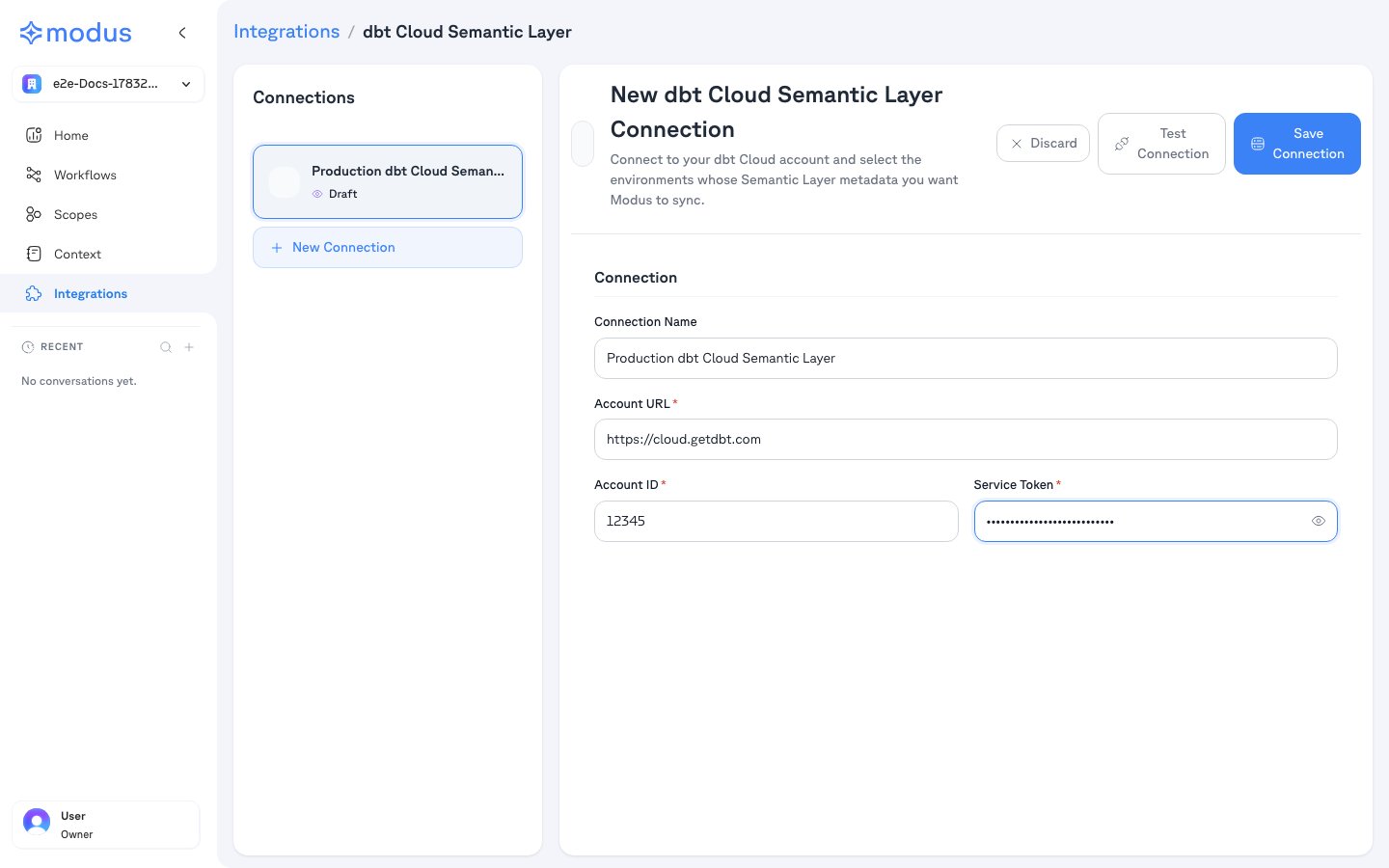 1. Click **Test Connection** to verify Modus can reach your account.
2. Click **Save Connection**.
After saving, Modus lists your environments. Select the ones whose Semantic
Layer metadata you want Modus to sync, then save.
## Connection form field reference
| Field | Description | Example |
| ------------------- | ---------------------------------------------- | ------------------------------------- |
| **Connection Name** | A friendly name for this connection | `Production dbt Cloud Semantic Layer` |
| **Account URL** | Your dbt Cloud access URL | `https://cloud.getdbt.com` |
| **Account ID** | Your dbt Cloud account ID | `12345` |
| **Service Token** | A service token with Discovery API read access | *(your token)* |
## Troubleshooting
| Symptom | Likely cause |
| ----------------------------- | ----------------------------------------------------------------------- |
| **Authentication failed** | The service token is invalid, or lacks Metadata (Discovery) API access. |
| **Account not found** | Wrong **Account URL** or **Account ID**. |
| **No metrics / models found** | The environment has no successfully built semantic manifest. |
## Verification
Your dbt Cloud Semantic Layer is now connected. Modus turns your semantic models,
metrics, and saved queries into context so Modus can answer
metrics-aware questions accurately.
Need help? Contact us at [support@getmodus.com](mailto:support@getmodus.com).
Modus connects read-only and requests only the minimum access needed to
understand your semantic layer. Your service token is encrypted and stored in
AWS Secrets Manager — never in plaintext.
1. Click **Test Connection** to verify Modus can reach your account.
2. Click **Save Connection**.
After saving, Modus lists your environments. Select the ones whose Semantic
Layer metadata you want Modus to sync, then save.
## Connection form field reference
| Field | Description | Example |
| ------------------- | ---------------------------------------------- | ------------------------------------- |
| **Connection Name** | A friendly name for this connection | `Production dbt Cloud Semantic Layer` |
| **Account URL** | Your dbt Cloud access URL | `https://cloud.getdbt.com` |
| **Account ID** | Your dbt Cloud account ID | `12345` |
| **Service Token** | A service token with Discovery API read access | *(your token)* |
## Troubleshooting
| Symptom | Likely cause |
| ----------------------------- | ----------------------------------------------------------------------- |
| **Authentication failed** | The service token is invalid, or lacks Metadata (Discovery) API access. |
| **Account not found** | Wrong **Account URL** or **Account ID**. |
| **No metrics / models found** | The environment has no successfully built semantic manifest. |
## Verification
Your dbt Cloud Semantic Layer is now connected. Modus turns your semantic models,
metrics, and saved queries into context so Modus can answer
metrics-aware questions accurately.
Need help? Contact us at [support@getmodus.com](mailto:support@getmodus.com).
Modus connects read-only and requests only the minimum access needed to
understand your semantic layer. Your service token is encrypted and stored in
AWS Secrets Manager — never in plaintext.